Forward the plan.
Secy's got it.
Forward a screenshot, PDF, or email to your personal @myaisecy.com address. Secy reads it and adds it to your calendar. You can also let your spouse, coach, or caregiver forward directly to your Secy.
Tobias, your AI Secy, turned this forwarded screenshot into three league games with the right locations and times.
You sent
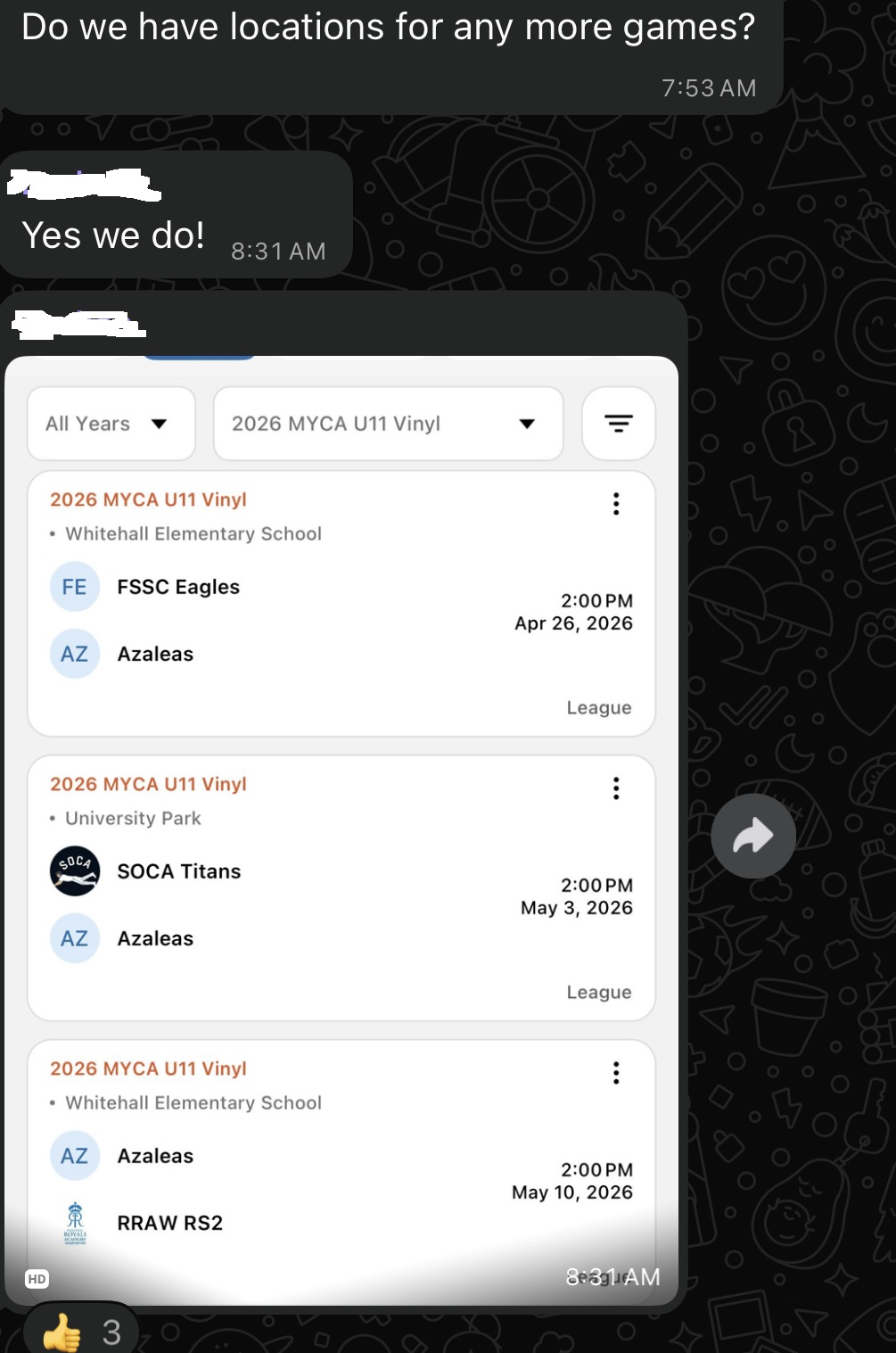
Tobias created
Built for the way plans really show up.
One workflow for personal and family coordination when the information is messy, forwarded, or incomplete.
Personal
Forward appointments, dinner plans, travel notes, and quick reminders. Let Secy turn them into something you can actually use.
Family
Send school schedules, sports screenshots, camp PDFs, and pickup changes. Keep your household schedule together.
Caregiving
Forward appointment reminders, discharge instructions, therapy schedules, and follow-up emails. Keep care logistics in one place.
Attachments stay with the plan.
When a forwarded email carries a boarding pass, itinerary PDF, ticket, or screenshot, Secy uploads it to your Google Drive and attaches it to the calendar event Secy creates. myaisecy only writes files it creates for you — it does not read anything else in your Drive. You can turn off automatic Drive uploads any time in your settings.